Instead of Jira Software
Plan & track
- Board, backlog, list, calendar, timeline, roadmap
- Sprints with burndown and velocity
- Each project its own workflow, fields and automation
- Jira-style query search, saved filters, bulk edit
Your tracker, service desk, docs and dashboards in one workspace — plus four AI agents that spec, design, build and test each story on its own branch. A person approves every design, and nothing merges without you.
The demo needs no sign-up. Have a real project? Selected teams get 6 months free →
Reserve and release stock on order
PR open
You merge
Sandbox
Never prod
Rollback
One consent
Activity on the story
Wrote 6 acceptance criteria. 2 already exist in FBF-2, so I linked them instead of repeating them.
Reuse StockService. Add one field, Reserved__c. No change to the order flow.
Approved. Keep the release job idempotent.
Built and tested in the sandbox. Opened PR #18 on feature/FBF-6. Build is green.
5 of 6 criteria pass with screenshots. Sent bug FBF-9 back to Dev.
One workspace
Same keys everywhere — FSC-12 is a story on the board, a ticket in the portal, a row on a dashboard and a branch in Git.
Agents work only on branches and in sandboxes or staging. They open pull requests; a person merges. AI can make mistakes — please verify before approving anything.
Side-by-side with Jira and ClickUpHow the crew works
Spec and acceptance criteria, checked against what your codebase already has.
Design against the system as it is — reuse what exists, flag what's missing.
The story's owner approves the design or sends it back with a note.
Writes the code, runs build and tests, deploys to staging, pushes a branch, opens a PR.
Tests every criterion with evidence and loops bugs back to Dev until they pass.
A fixed monthly fee per agent, per project — never per token. AI is included, or bring your own AI keys and pay less. The agents can also run on your own Claude Code, GitHub Copilot or Codex plan, on your Mac or server. Staging and sandboxes only; production is never a target.
How work reaches production
Pravadh PM doesn't connect to your org, servers or app stores, and stores no production credentials. Work travels the road your team already trusts: agents build in a sandbox on your runner, push a pull request to your version control, and the pipeline file in your repo (.yaml) deploys it — for Salesforce, web, mobile or any other stack.
Pravadh Delivery Flow
One story, from plan to production, on Salesforce.
What happens at each step
1on:2 push: { branches: [main] }3jobs:4 deploy:5 steps:6 - run: sf project deploy start7 --target-org uat --test-level RunLocalTests
BRDs become stories, sprints and acceptance criteria. Holds no logins to your servers, app stores or orgs.
On your own Mac or server, with your own tools and logins. Agents build and test in staging or a sandbox. Production is refused.
Each story gets its own branch and pull request. The agents can't merge — a person on your team does.
Your CI/CD promotes merged work to UAT, production or the app stores, exactly as it does today. You decide when.
The same road for web, iOS, Android, Flutter, React Native, Oracle and backend services. For Salesforce, Pravadh PM never signs in to your org: agents use the Salesforce CLI login on your runner, in a sandbox only.
BRD to backlog
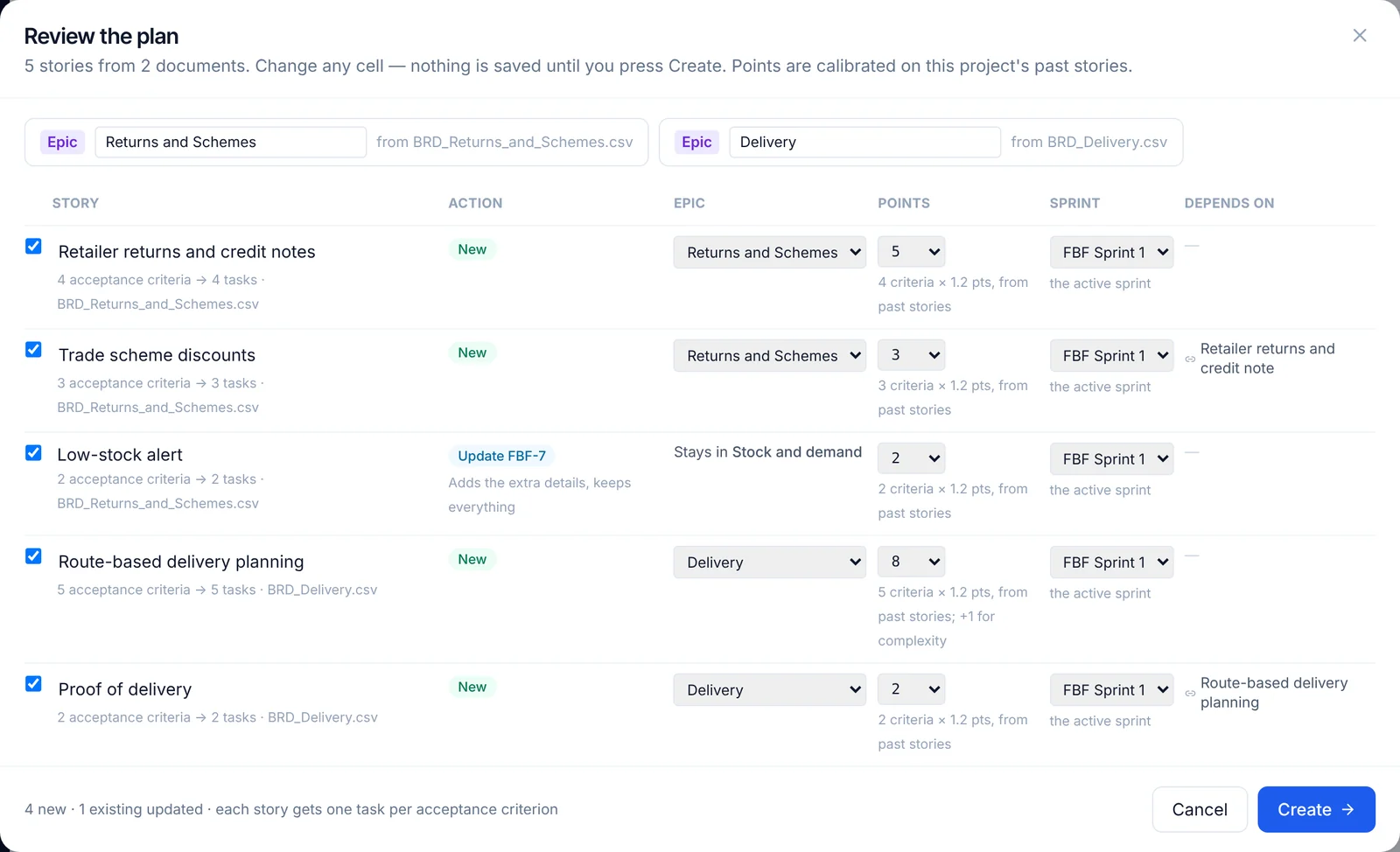
Tick the BRDs and story workbooks on a project and press Plan. Each BRD becomes an epic, every story gets story points from its acceptance criteria (calibrated on your past stories), a sprint that respects its dependencies, and "blocks" links to the stories it waits on. A story you already have is updated with the extra detail instead of created twice.
QA with evidence
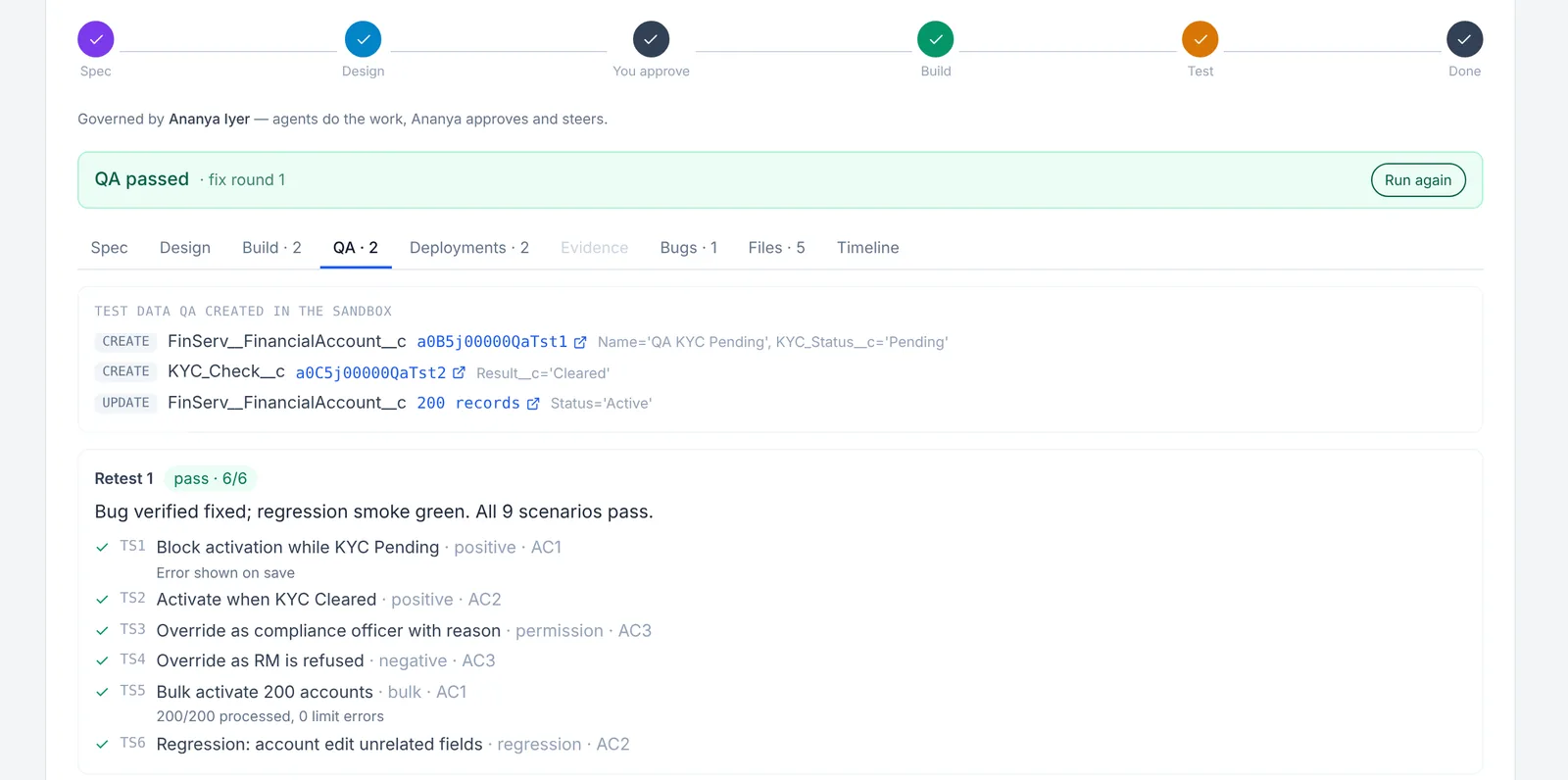
QA turns the acceptance criteria into positive, negative, edge and permission scenarios, automates and runs them with your test commands, and records screenshots of your preview site (or Salesforce pages) as proof. Failures become bugs that go straight back to Dev — up to the rounds you set.
Built for every stack
Mobile, web, CRM or ERP — the same board, sprints and docs, and the same agent crew on your own runner.
See every feature, with screenshotsPricing at a glance
Yes. It replaces Jira Software, Jira Service Management, Confluence and dashboard tools in one workspace on Jira-style keys, and you can import from Jira or keep it in two-way sync while you switch. On top of that, four AI agents spec, design, build and test each story.
No. Agents are a fixed monthly fee per agent, per project, and the AI is included — we pick the right model for each job, so there are no token bills. If you would rather use your own AI keys, the agents cost less and your provider bills the AI to you directly. Agents can also run on your own Claude Code, GitHub Copilot or Codex plan.
No. Agents work on a branch per story and deploy only to staging or a sandbox. They open a pull request and a person merges it. AI can make mistakes, so every design and change is there for you to verify before you approve it.
Web, iOS, Android, Flutter, React Native, Salesforce, Oracle and backend services such as .NET, Java and Python. The agents read your repository first and reuse what already exists.
Sign in as the demo user to see a full workspace with a recorded agent run. Teams with a real project can also apply to the Pravadh Labs Early Access Program: selected teams get six months of free access, priority onboarding and a direct line to the team.