Features

Everything in the workspace, as it really looks.

Board, budget, docs, and an AI agent crew that builds and tests Salesforce stories — every screenshot below is the product.

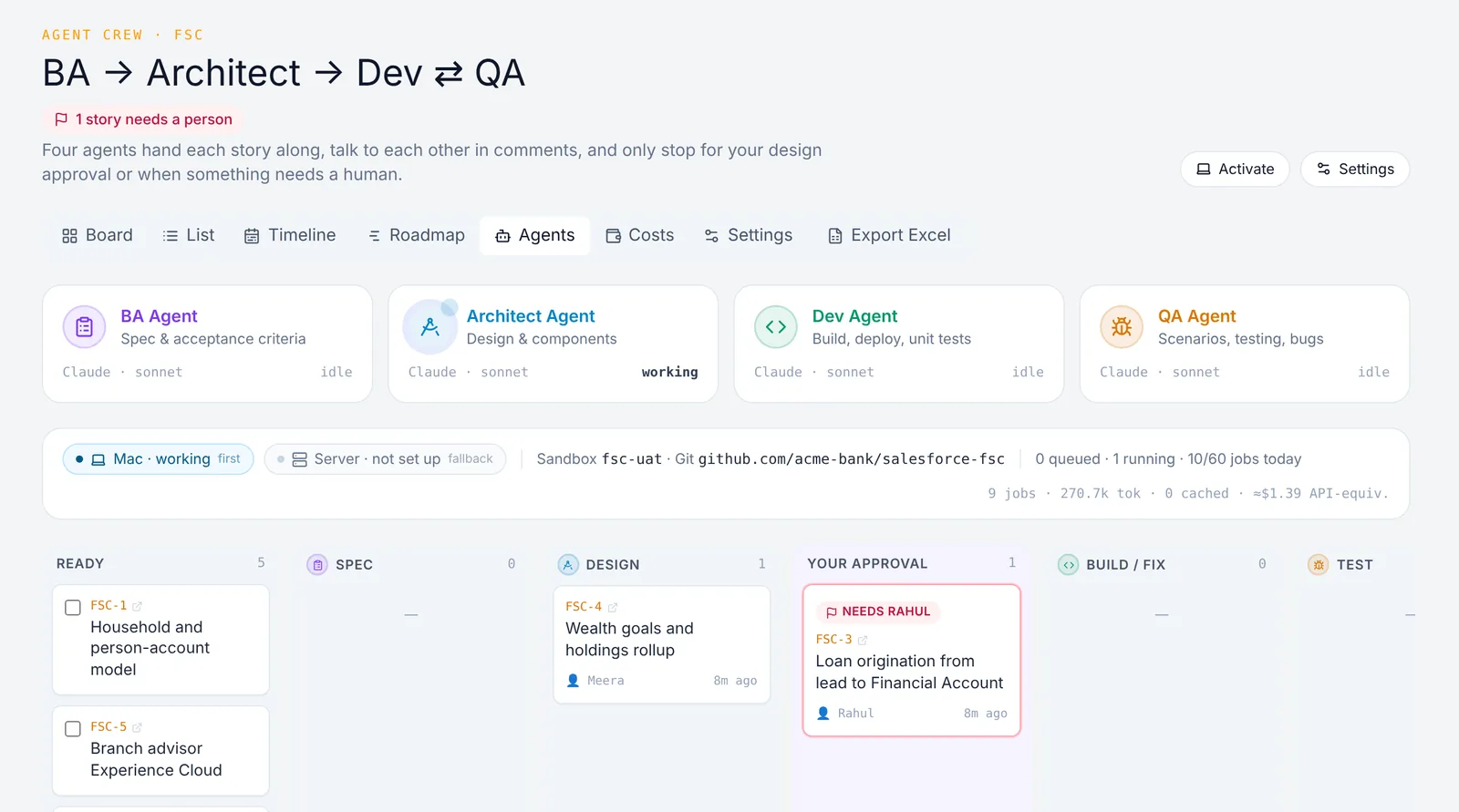
AI agent crew

BA → Architect → Dev ⇄ QA, on any stack

Web, iOS, Android, Oracle, Python, Java, .NET or Salesforce — hand a story to the crew and watch it move through spec, design, build, and test. The agents run on Claude Code or Codex on your own Mac or server — your existing subscription, not per-token API bills. If the Mac is offline, the server picks the work up.

  • Each agent hands off in a comment on the story
  • Mac first, server fallback — work doesn't stop
  • Flags the story owner when it needs a person
BA → Architect → Dev ⇄ QA, on any stack

Grounded in your org

Checked against what already exists before anything is built

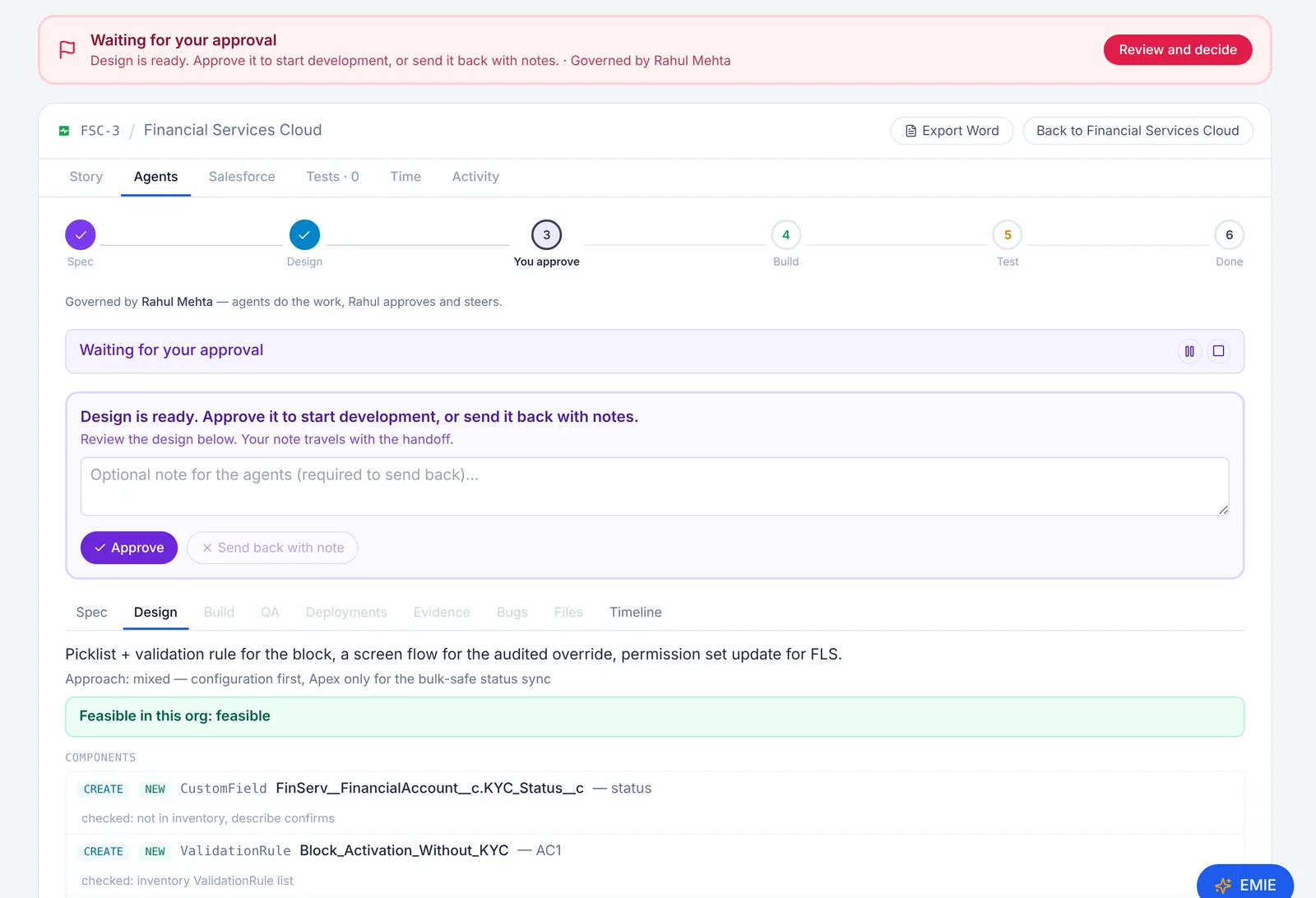
The agents read your repository first — modules, endpoints, tables, screens — and, for Salesforce, the connected org’s objects, fields, flows and permissions. Every component in the design says whether it already exists and how that was checked, so nothing is built twice and nothing infeasible gets past the design gate.

  • Feasibility verdict on every spec and design
  • Existing components are reused, never recreated
  • You approve the design, or send it back with a note
Checked against what already exists before anything is built

Traceable delivery

Every build, test and deployment, on the story

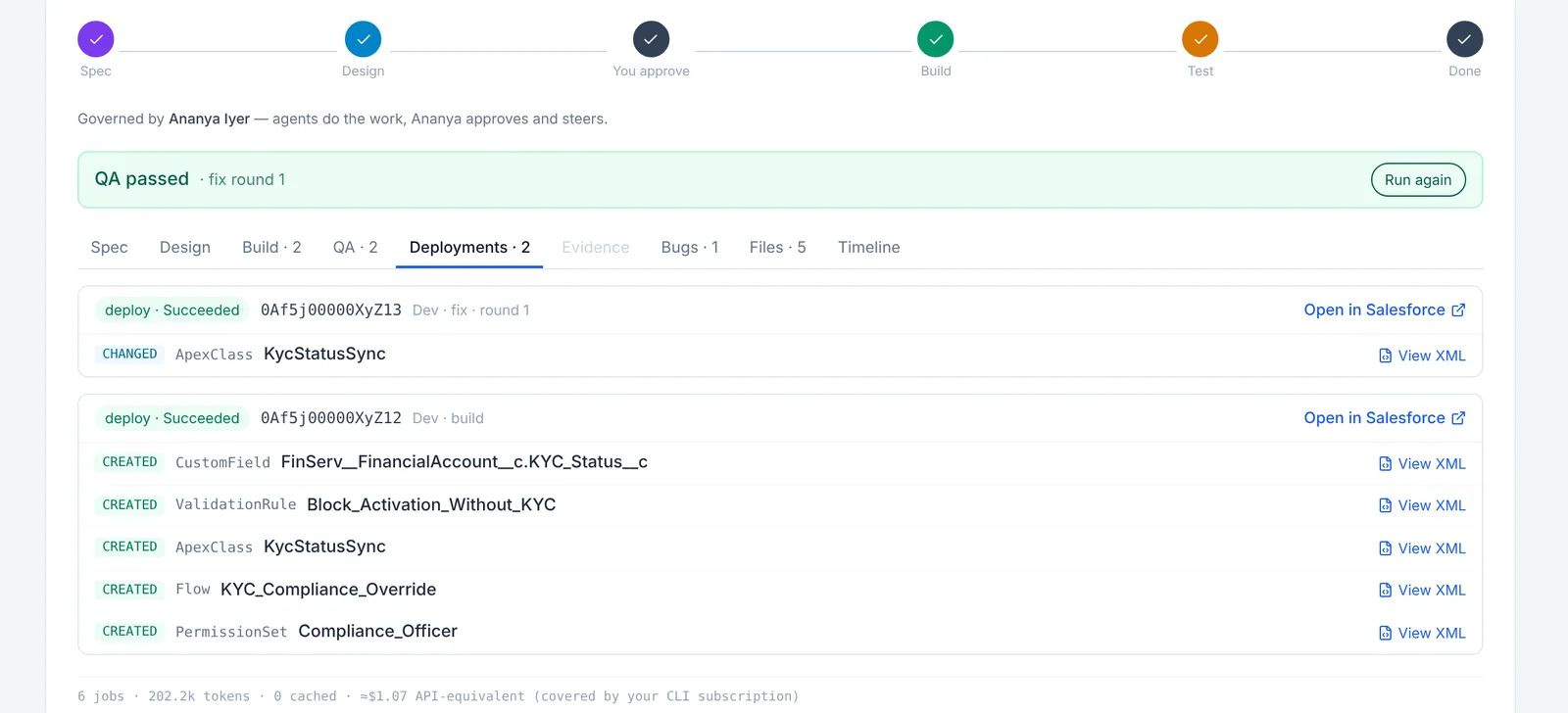
Every build and test command the agents run is recorded with its result and output. Each deployment — to your staging site, a TestFlight / Firebase build, a dev schema or a Salesforce sandbox — lands on the story with what changed and a link to open it. Production is never a target.

  • Builds, tests and deployments per round
  • Open the changed files, XML or code
  • Staging and sandboxes only
Every build, test and deployment, on the story

QA with evidence

Tests, test data, screenshots, and a bug loop

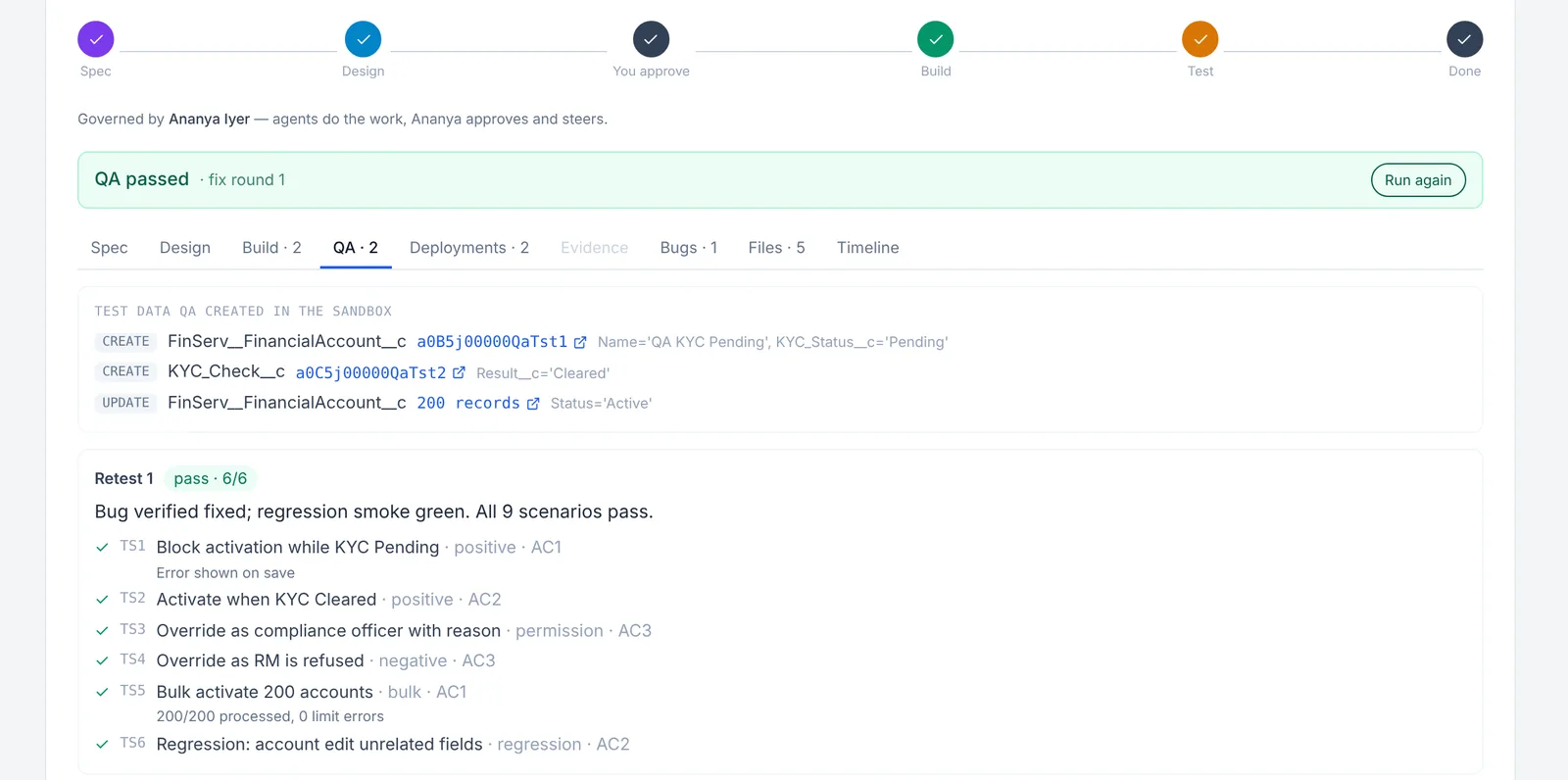
QA turns the acceptance criteria into positive, negative, edge and permission scenarios, automates and runs them with your test commands, and records screenshots of your preview site (or Salesforce pages) as proof. Failures become bugs that go straight back to Dev — up to the rounds you set.

  • Scenario results mapped to acceptance criteria
  • Test runs and screenshots as evidence
  • Bugs → Dev fix → QA retest, automatically
Tests, test data, screenshots, and a bug loop

Git, the safe way

One branch per story. A pull request, never a merge

Connect your repository and every story gets its own branch named from its key and title. Dev commits and pushes after each build or fix and opens a pull request when development is done. Nobody but you merges to main.

  • feature/KEY-12-story-title branches
  • PR link on the story and in exports
  • Refuses to touch main or your base branch
FSC-2 · KYC and compliance flags on Financial Account

Branch from develop

feature/FSC-2-kyc-and-compliance-flags-on-financial-account

  1. 9f3c2a1 Dev Agent build — 5 files
  2. c41d9e0 Dev Agent bug fixes (round 1) — 1 file
Pull request #42 · open for reviewNever merged by the agents

Import any file

Drop a messy backlog. We fix it, you check it

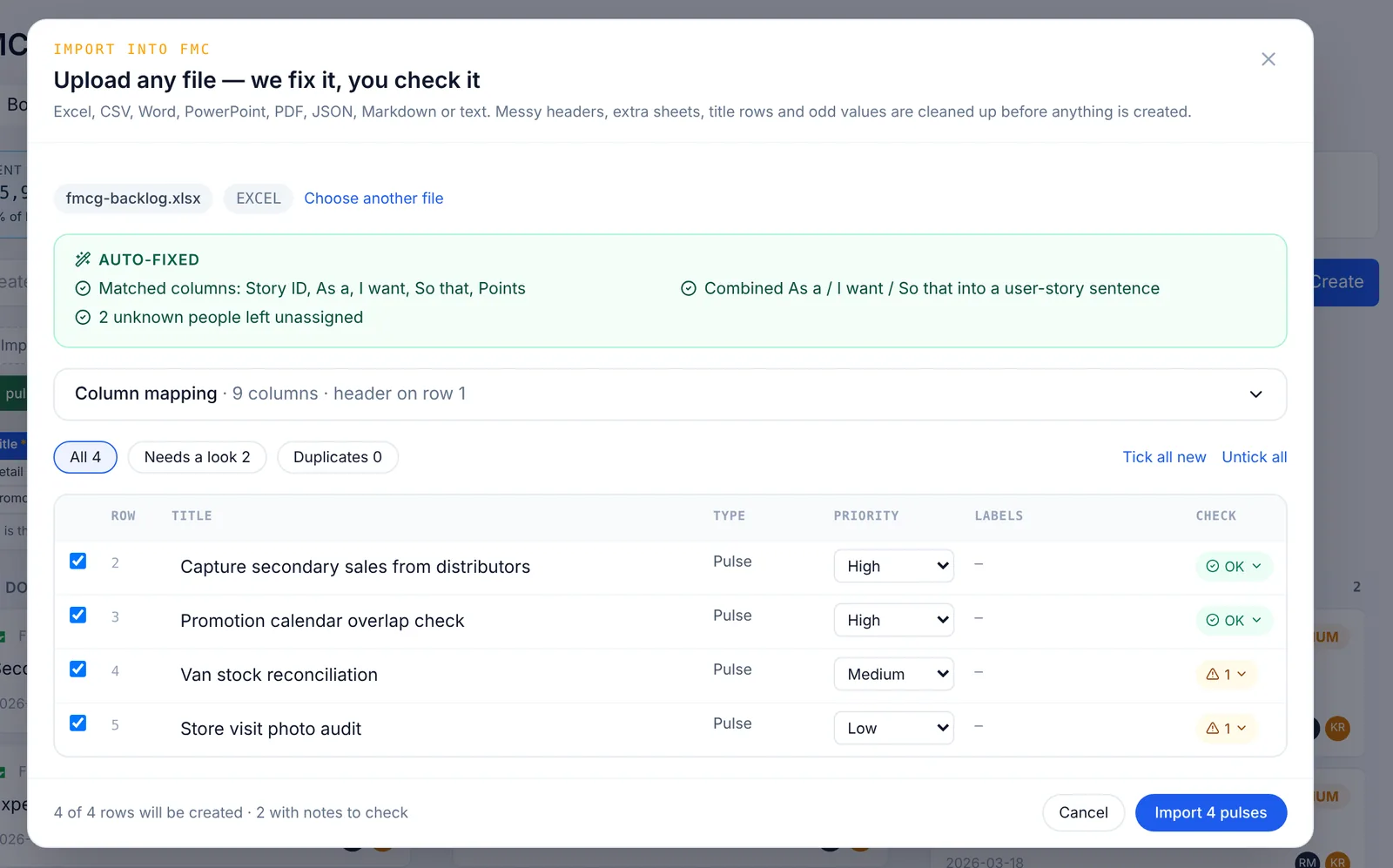
Excel, CSV, Word, PowerPoint, PDF, JSON, Markdown, or plain text. Odd headers, title rows, extra sheets, and "As a / I want / So that" columns are cleaned up and mapped before anything is created — with duplicates and rows that need a look called out.

  • Up to 500 rows and 15 MB per file
  • Story points, owners, and agents mapped by name or email
  • Review every row before it lands
Drop a messy backlog. We fix it, you check it

Your drive, your files

Files and story documents live in your Google Drive or OneDrive

Sign in with Google or Microsoft and pick a folder. Every project gets its own sub-folder with a document per story, every upload, and every QA screenshot. A small cache keeps pages instant and uploads sync in the background — and new projects can't start until Git and storage are connected, so nobody loses a day later.

  • Sign in with Google or Microsoft, pick a folder
  • A folder per project, a document per story
  • Fast: local cache, background sync
My DriveAll synced
  • Pravadh PM
  • FSC - Financial Services Cloud
  • Stories
  • FSC-2 KYC and compliance flags on Financial Account.md
  • FSC-3 Loan origination from lead to Financial Account.md
  • Files
  • QA - Block activation while KYC Pending.png

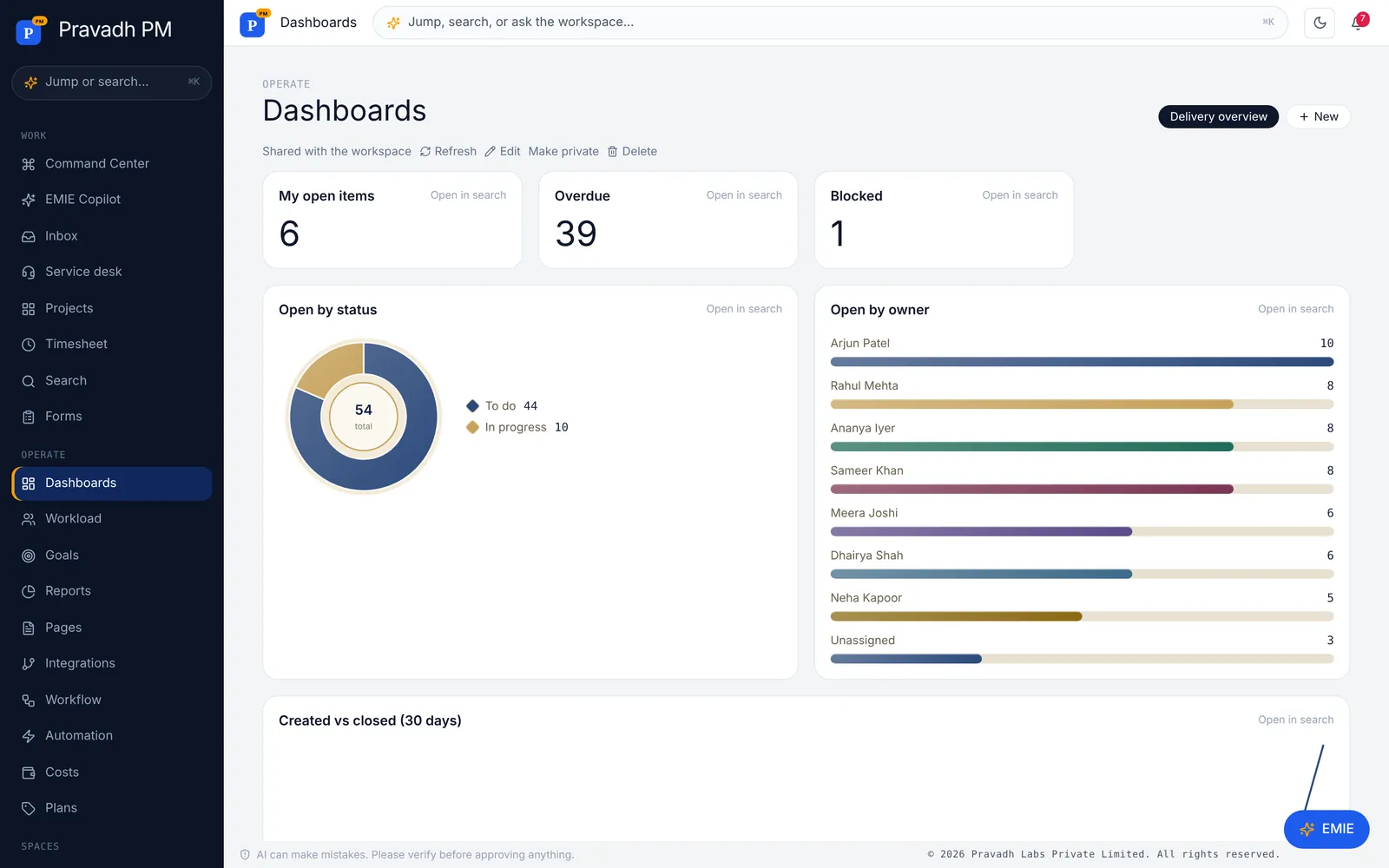
Dashboards

A live picture for every team

Start from a ready-made overview — my open work, overdue, blocked, by status, by owner, created vs closed — or build widgets from any saved search. Every number links back to the exact list behind it.

  • Number, points, pie, bar, list and trend widgets
  • Group by status, owner, project, sprint or a custom field
  • Open in search from any widget
A live picture for every team

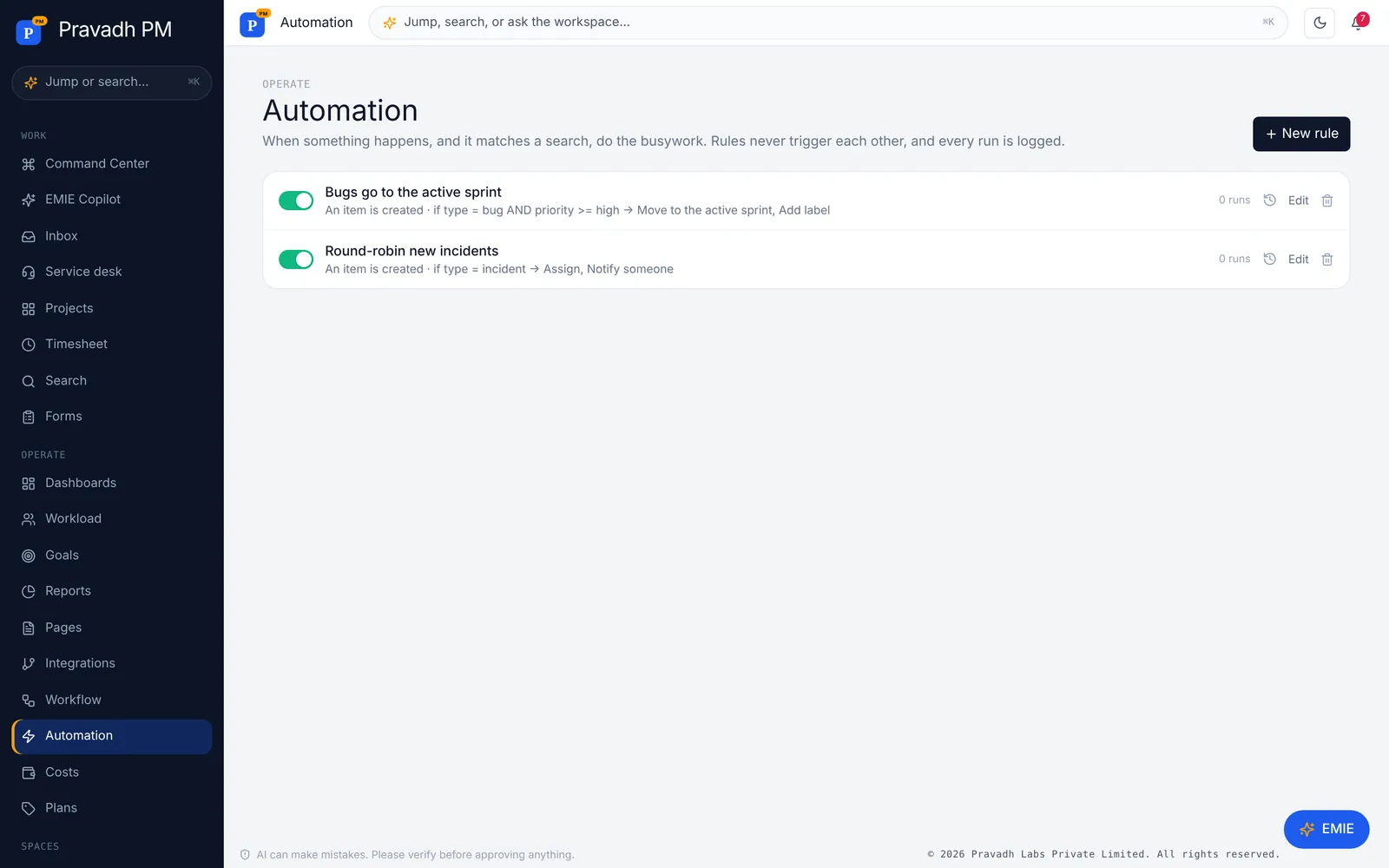
Automation

Rules that do the busywork

When an item is created, changes status, changes a field, gets a comment — or on an hourly or daily schedule — and it matches a search, run up to ten actions. Starter templates cover the common ones: bugs into the active sprint, round-robin incidents, overdue nudges.

  • Set fields, assign, label, comment, notify, create follow-ups
  • Test a condition before you save
  • Run log per rule; rules can't loop
Rules that do the busywork

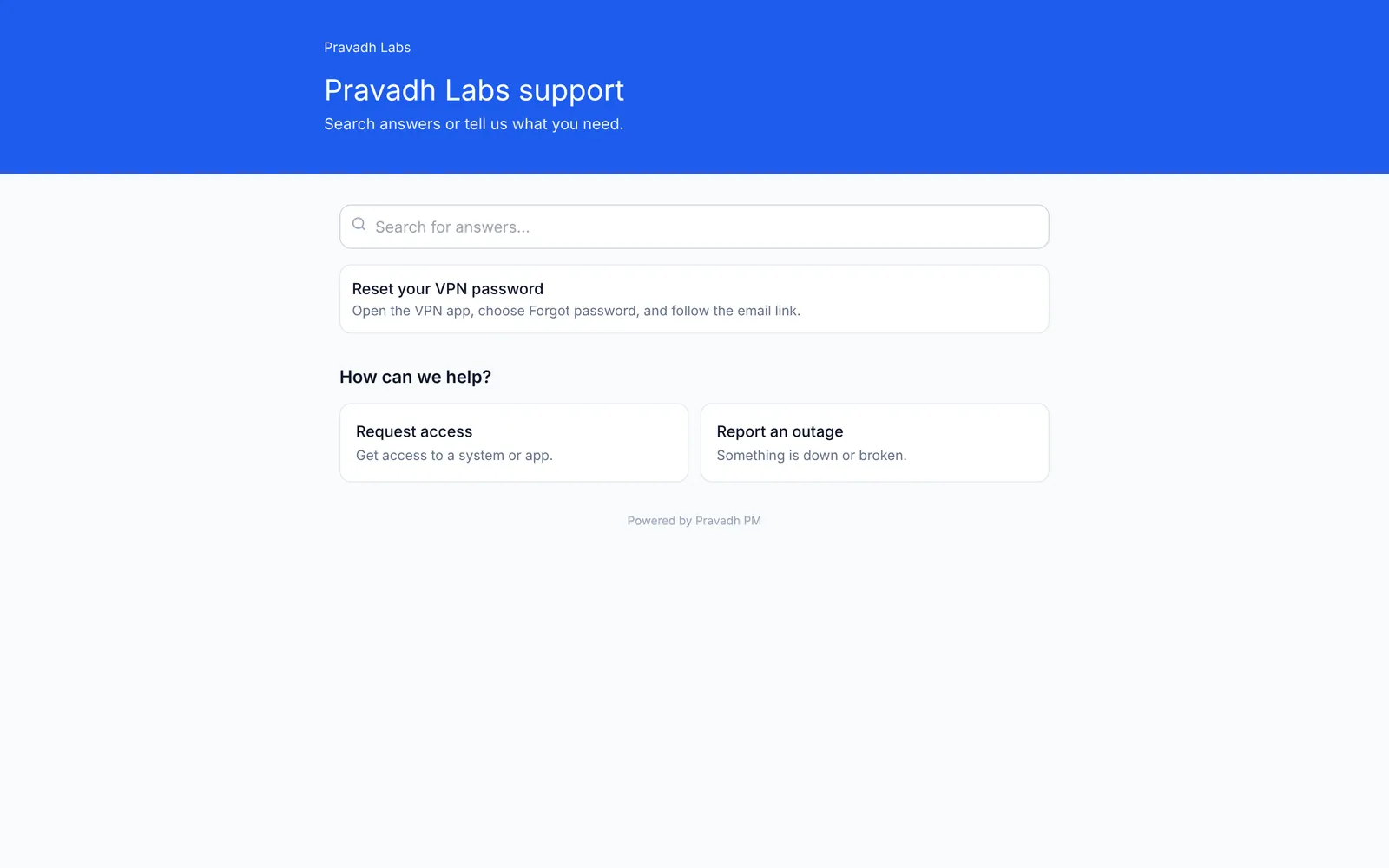
Service desk

A help center your customers will actually use

Turn on the portal and customers search your published pages and send requests from your forms — no account needed. Suggested articles appear as they type. They follow replies from a private link or by email, and replying reopens a closed ticket.

  • SLA clocks on your business hours and holidays
  • Email-to-ticket from Postmark, SendGrid, Mailgun or Resend
  • Internal notes stay internal
A help center your customers will actually use

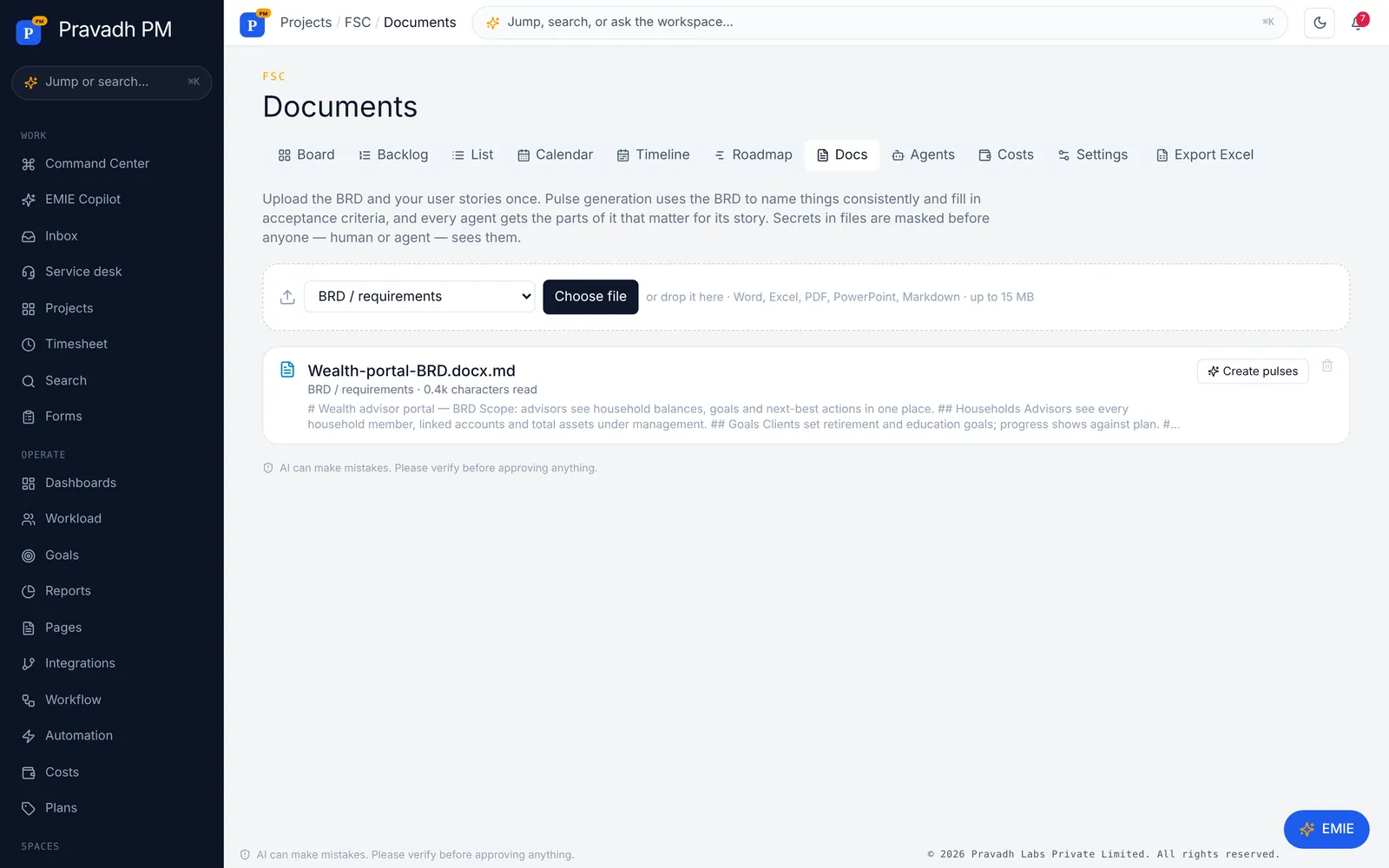
BRD-grounded

Upload the BRD once. Everything reads it

Put the BRD, solution design and user-story workbook on the project. Create pulses straight from them, and every agent gets the parts of the BRD relevant to its story — plus any pages you link to the pulse. Secrets in files are masked before anyone sees them.

  • Word, Excel, PDF, PowerPoint and Markdown
  • Create pulses from a story workbook in one click
  • Pages link to pulses both ways
Upload the BRD once. Everything reads it

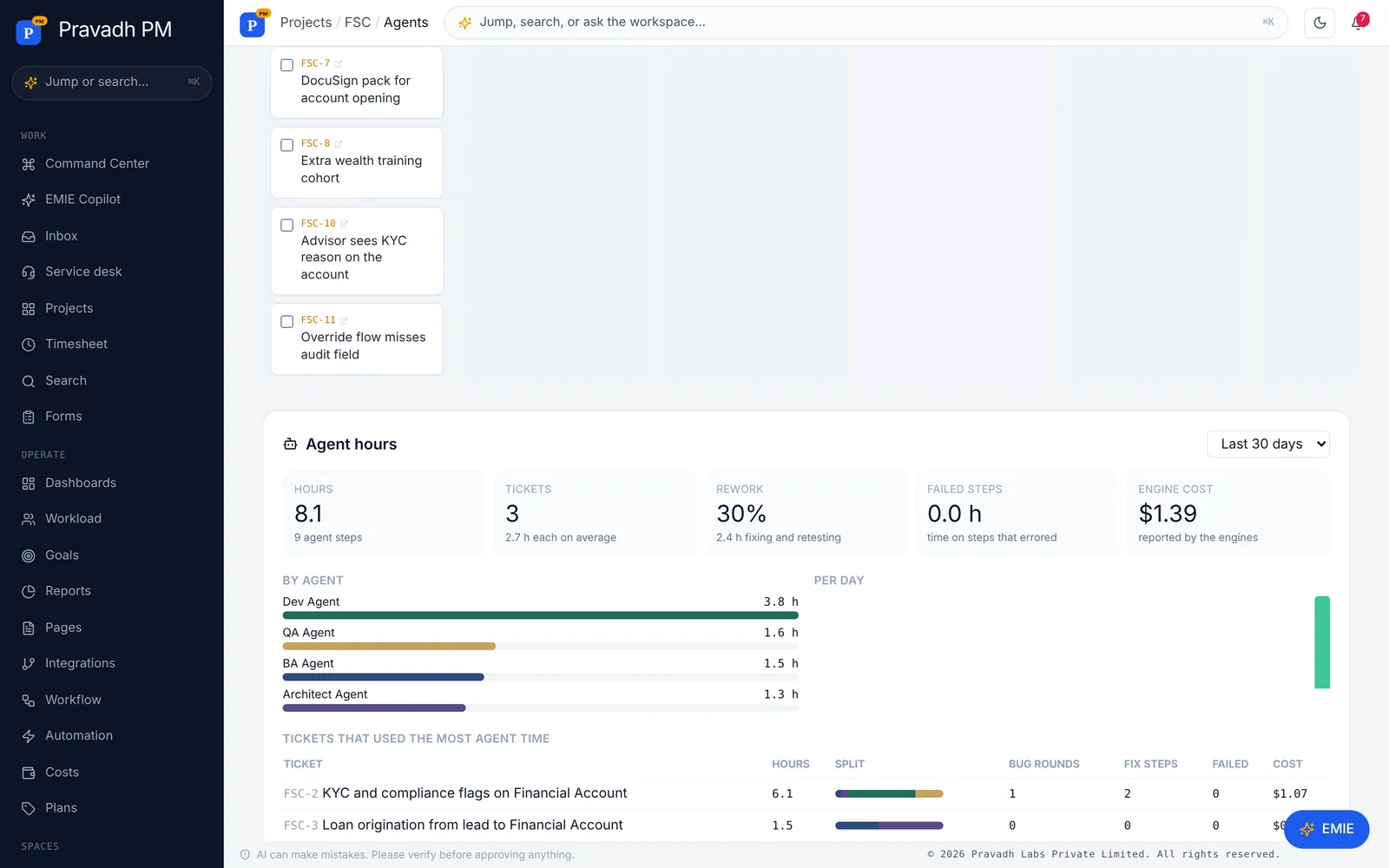
Agent hours

Know where the crew's time goes

Hours per agent, project and ticket, first pass vs rework, failed steps, bug rounds and engine cost — on every project and in Reports. Find the stories that keep bouncing between Dev and QA before they eat the month.

  • Top tickets by agent time
  • Rework share and failed steps
  • Engine cost reported by Claude Code / Codex
Know where the crew's time goes

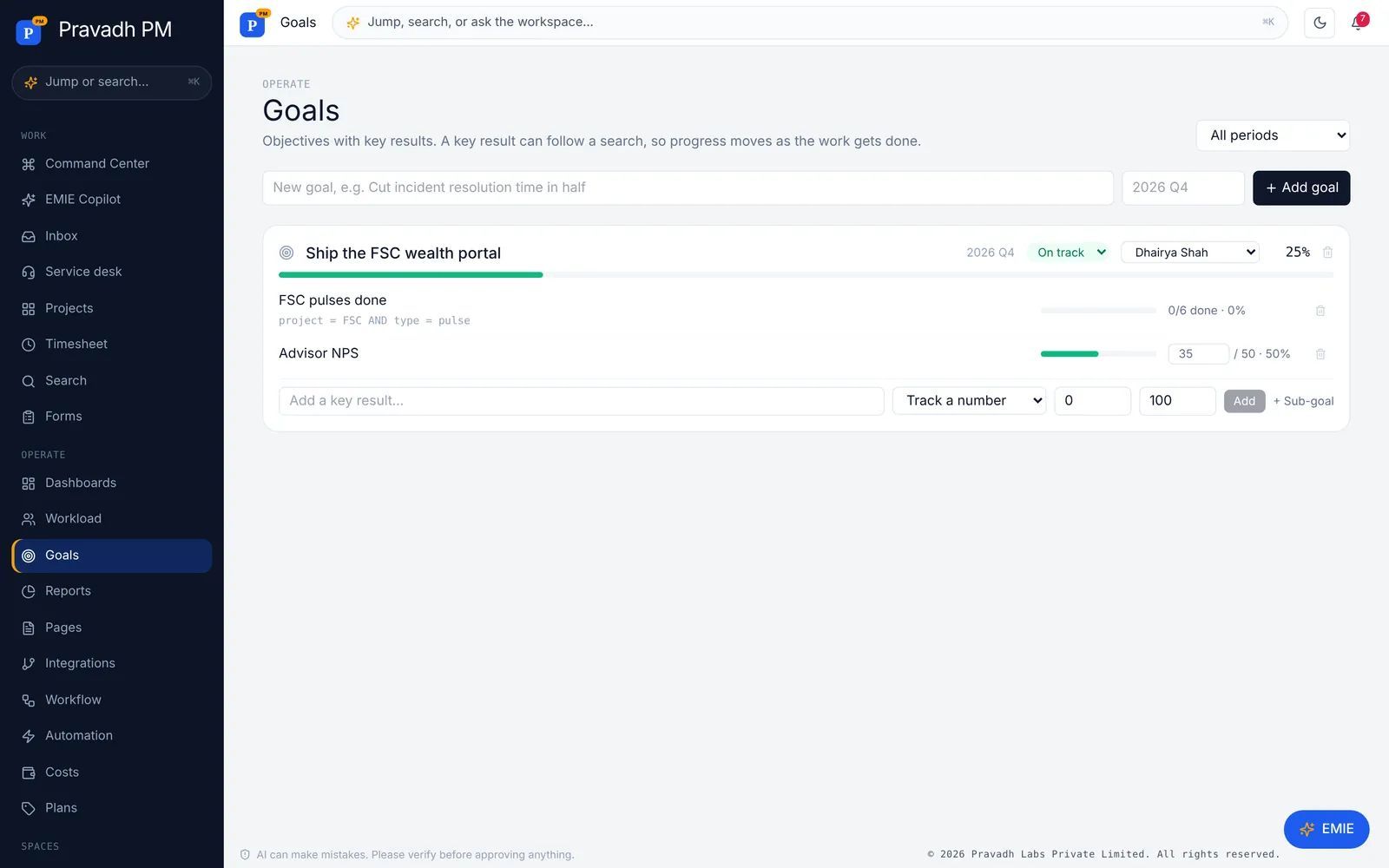
Goals

Goals that move when the work moves

Objectives with key results — a number you update, or a search whose items get done. Nest goals, set owners and periods, and watch progress update as stories close.

  • Key results driven by live work
  • Sub-goals and owners
  • On track / at risk / off track
Goals that move when the work moves

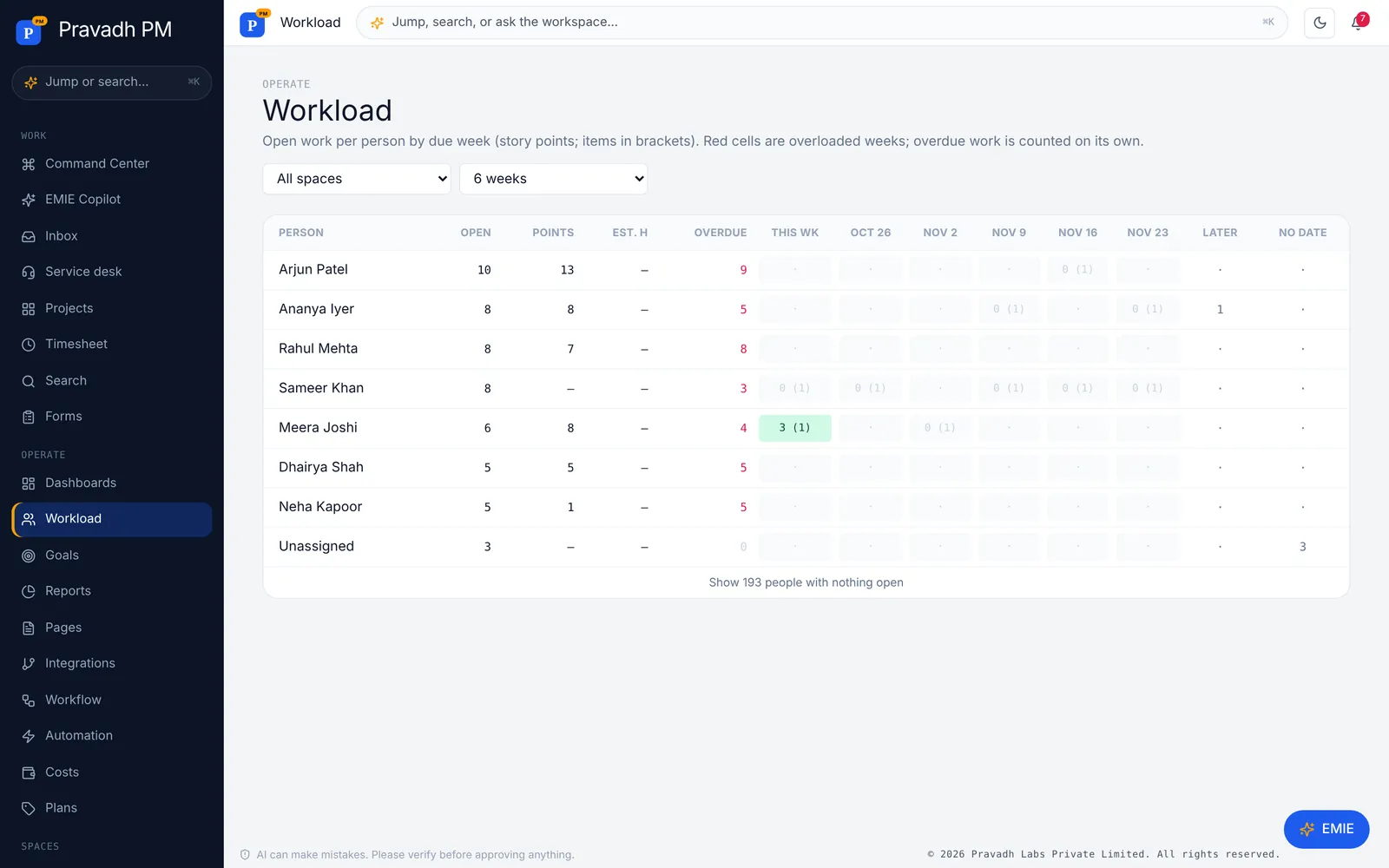
Plan the people

Workload, calendar, timers and recurring work

See points per person per week with overloaded weeks in red, drag due dates on a calendar, start a timer from any item, track estimates against actuals, and let stand-ups and reports create themselves.

  • Workload heatmap by due week
  • Calendar with drag-to-reschedule
  • Timers, estimates and recurring items
Workload, calendar, timers and recurring work

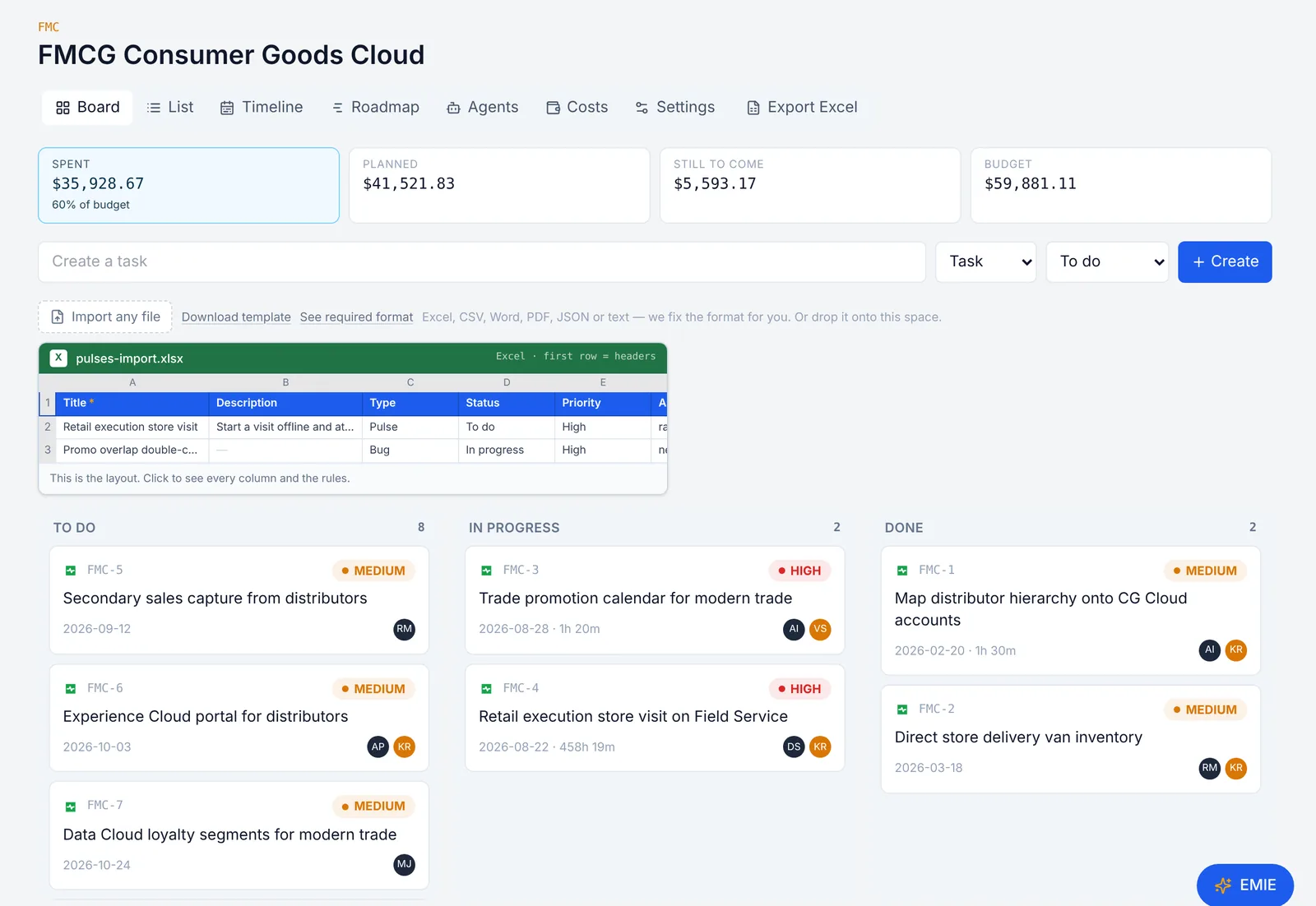
Board and money together

The board shows what it costs

Spent, planned, still to come, and budget sit above the board for every space. Board, list, timeline, roadmap, agents, costs, and settings are one tab apart — and the whole space exports to Excel with status, deployments, bugs, and QA results.

  • Excel export of every story with status
  • Word export of a single story with screenshots
  • Costs can be switched off per space
The board shows what it costs

Command Center

One next step, not a board to hunt through

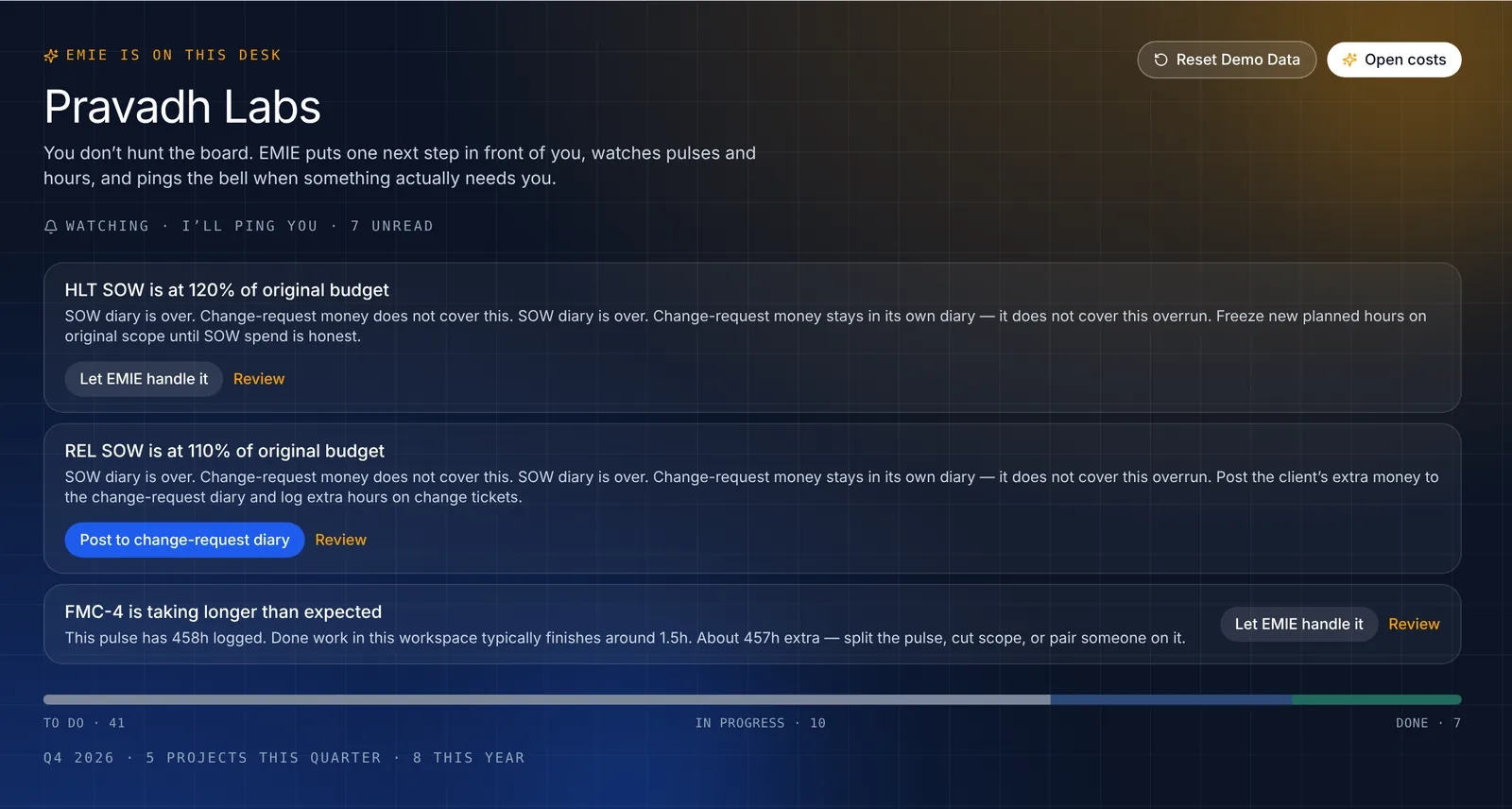
The copilot watches pulses, dates, hours, and budgets and puts the next move in front of you — the SOW that's over, the pulse that's stalling, the review nobody picked up. Rename it and point it at your own model on Studio.

  • Live coaching on Home
  • Your copilot name, your OpenAI-compatible key
  • Bell and email when something needs you
One next step, not a board to hunt through

Pages

Docs next to the work

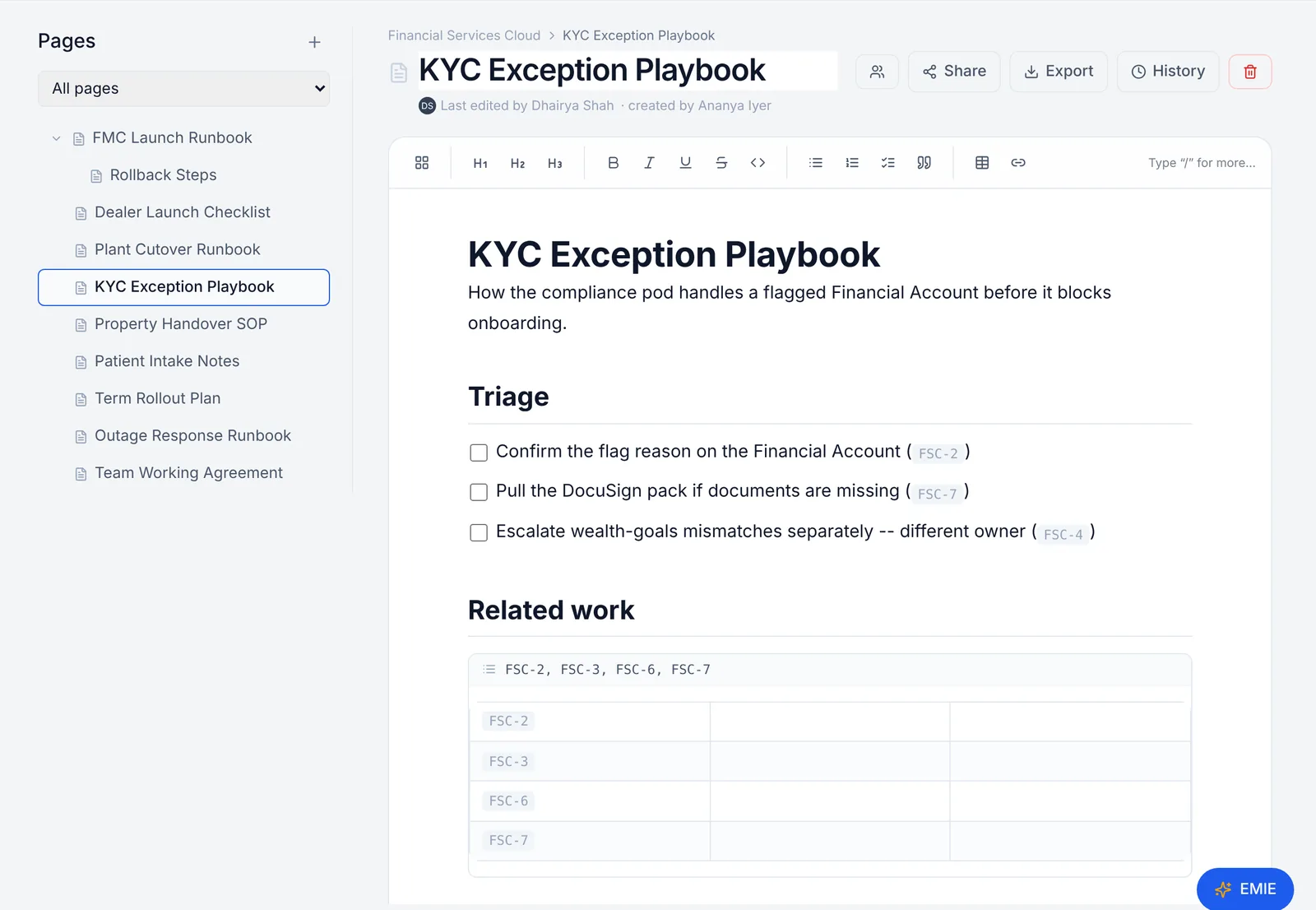
Runbooks, playbooks, and meeting notes live beside the board. Everyone types in the same page at once, comments anchor to the exact line, and pulse references show live status.

  • 22 templates and live co-editing
  • Version history and Word/PDF export
  • Live pulse tables
Docs next to the work

Costs

Budget, planned, spent — honest numbers

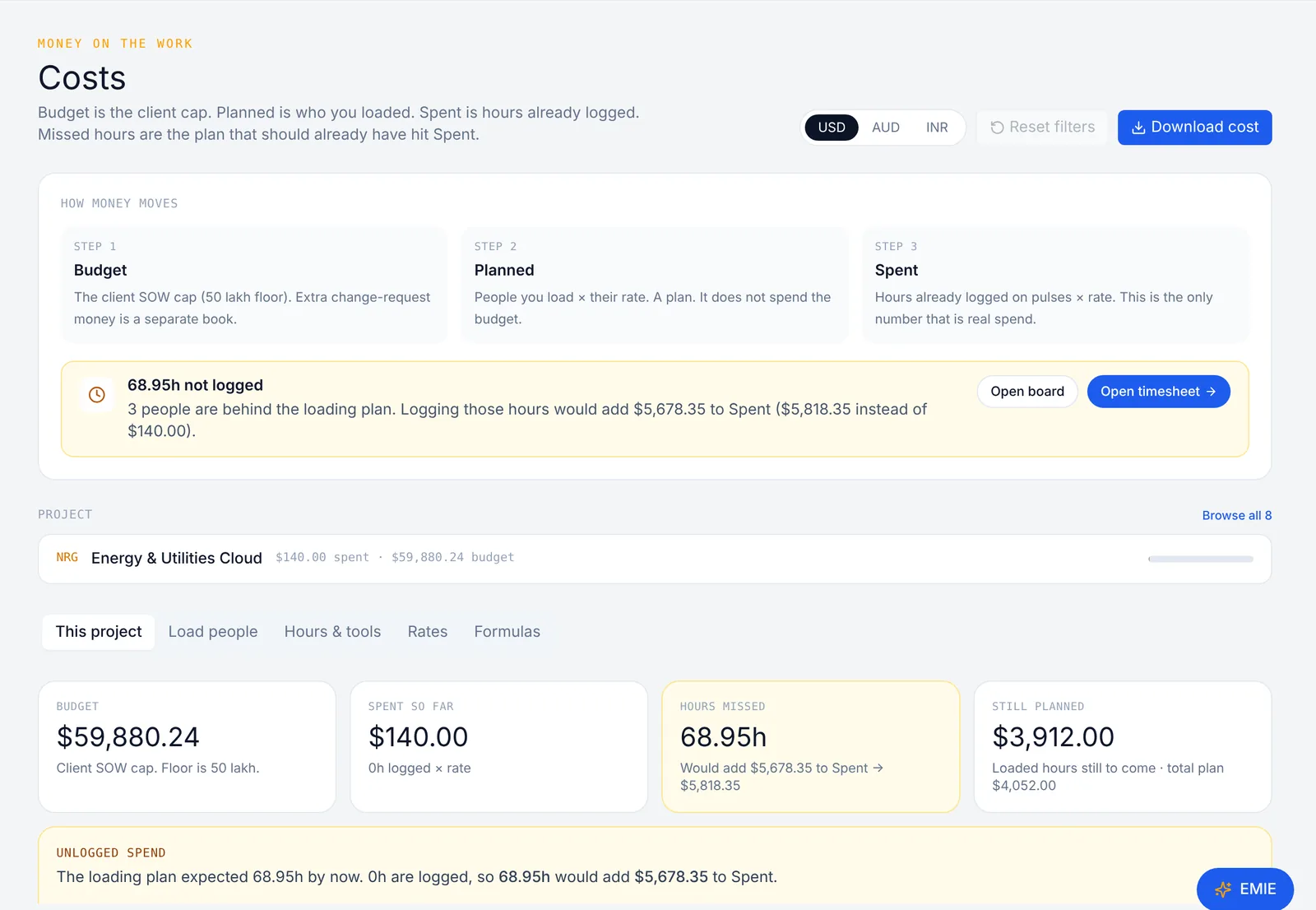
Budget is the client cap. Planned is who you loaded. Spent is hours actually logged. Missed hours show up as the plan that should already have hit Spent.

  • Loading sheet and burn bands
  • USD, AUD, INR
  • Download the cost sheet
Budget, planned, spent — honest numbers

Roadmap

An editable Gantt per space

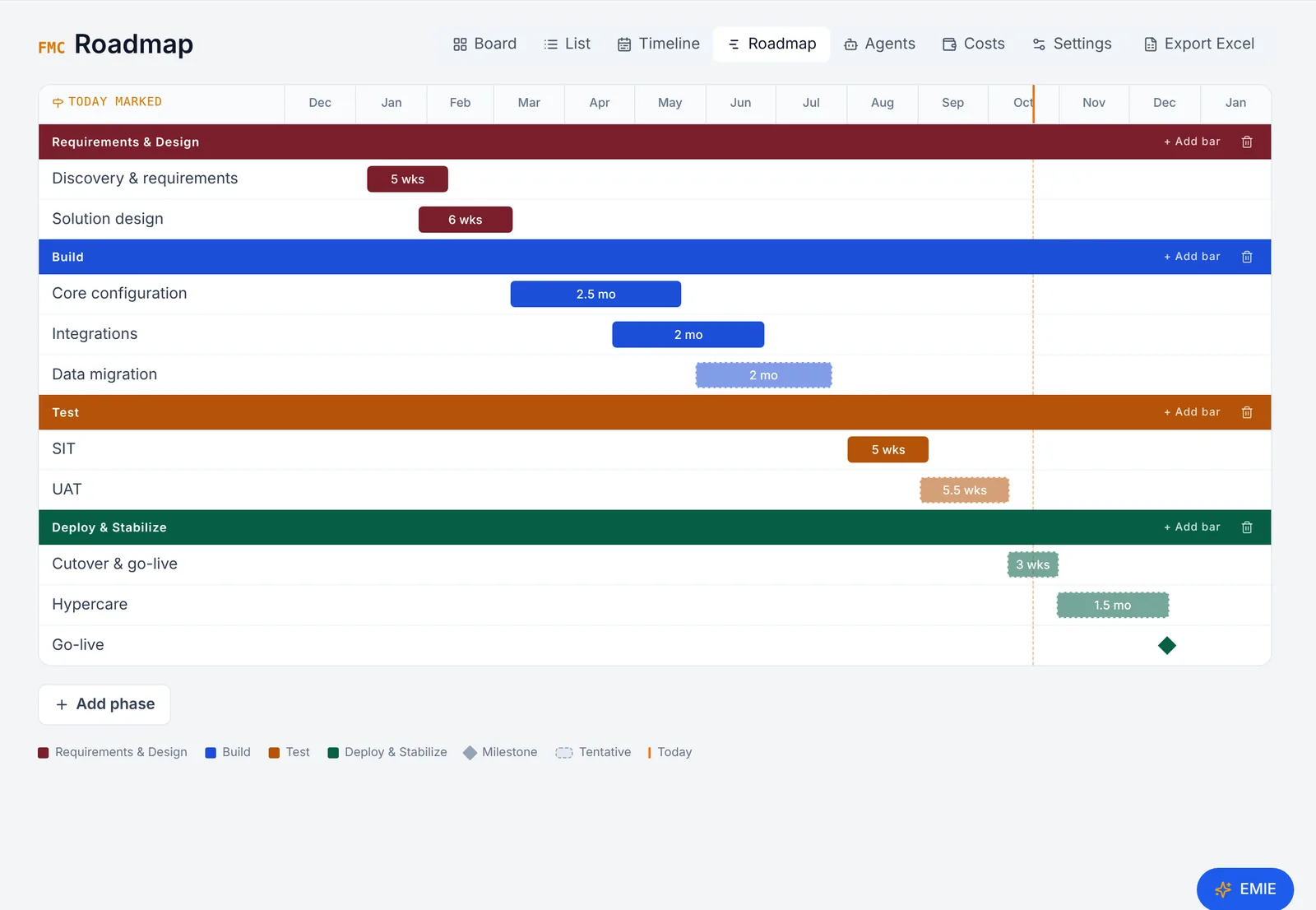
Phases and bars for requirements, build, test, and go-live, with today marked. Drag to re-plan; milestones and tentative work are clear at a glance.

  • Per-space phases
  • Milestones and tentative bars
  • Sits next to board and timeline
An editable Gantt per space

Integrations

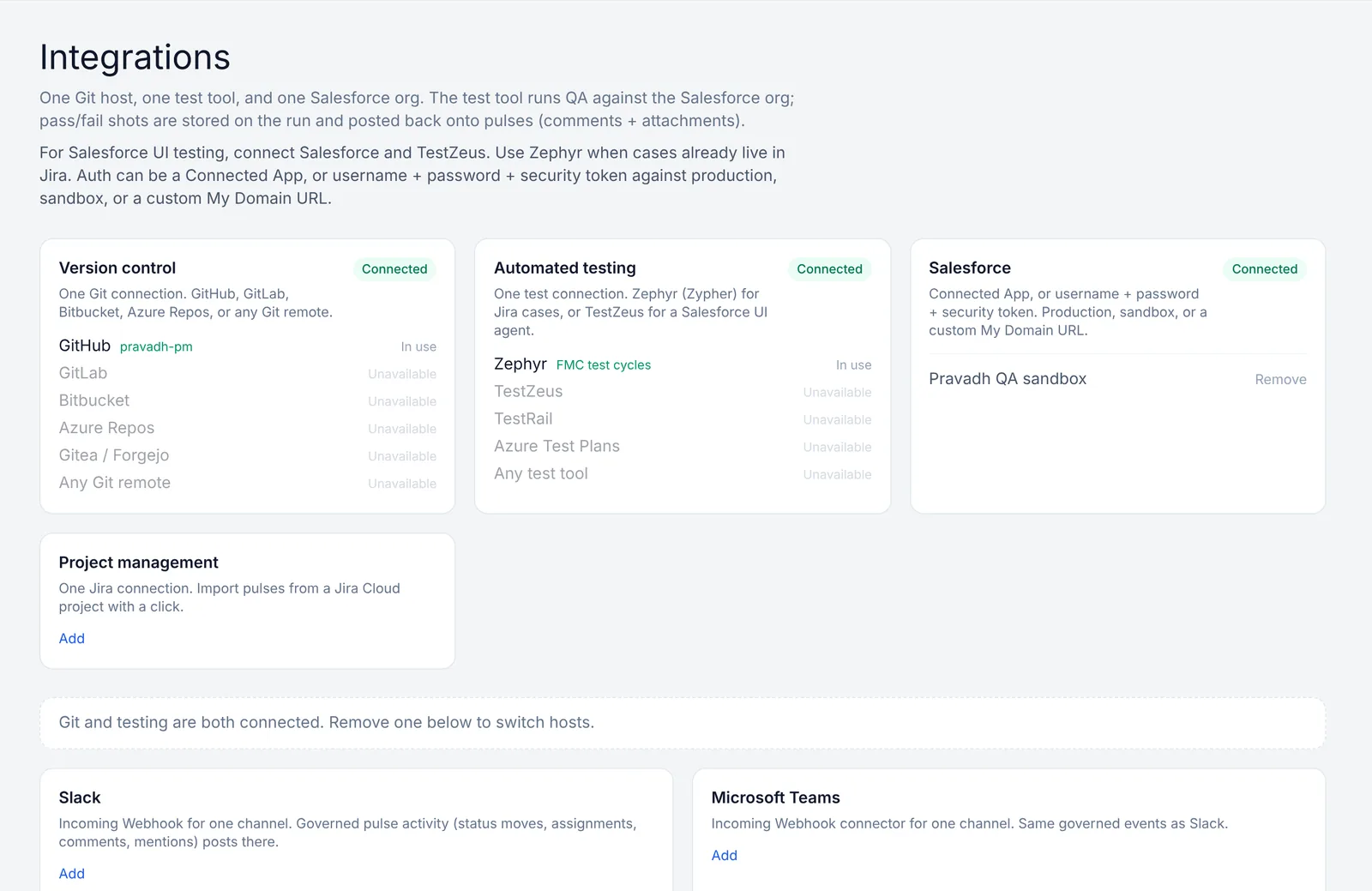
Git, Jira, Salesforce, Slack, Teams

One Git host, one test tool, a real Salesforce connection, two-way Jira sync, and Slack or Teams for the events you choose. Collaborators — up to 25 per space — get email on status, owner, bug, and work changes.

  • Jira import and two-way sync
  • Slack / Teams governed notifications
  • Up to 25 email collaborators per space
Git, Jira, Salesforce, Slack, Teams

The platform

Five jobs. One workspace.

Delivery

Pulses, stories, and ITSM on the same keys

FMC-4 is a pulse. REL-1 is an incident. Board, list, timeline, and roadmap all read the same work. Every story opens in its own browser tab with story points, owners, tests, time, and activity — and exports to Word in one click.

AI agent crew

Four agents build the story. A person governs it

BA writes the spec, Architect designs against your org, Dev builds and deploys to the sandbox, QA tests and files bugs back to Dev — every step a comment on the story. The person who owns the story approves the design and steers.

Money

SOW is the cap. Loading is a plan. Spent is hours

Paint people on the loading sheet — that is still planned. Spent stays 0 until someone logs time. Burn bands show who is at 60% and who is over. Personal or internal spaces can switch costs off entirely.

Docs

Pages live in the workspace. No separate wiki

22 templates, tables, checklists, anchored comments, version history, Word/PDF export, and live multiplayer editing. A pulse reference in a page shows its live status, not a stale link. Business plan and up.

Runtime

Wear your name. Run it on your servers

Logo and colors on every plan. Studio puts it on pm.yourcompany.com with an @company signup lock. Enterprise is a signed Docker image plus a license key — no source on your box, no Pravadh marks.

And the rest

Details that save a day a week

Pulses

Not another user story

The unit of software work. Pulses sit next to epics, tasks, and bugs on the same keys — with story points, owners, and a QA owner.

Story pages

Each story in its own tab

Open a story from the board, list, or timeline and it gets its own browser tab — story, agents, Salesforce, tests, time, and activity. Export it to Word with screenshots.

Agents as owners

Assign work to an agent

When agents are on for a space, Dev and QA agents can be the build or QA owner anywhere a person can — on the board, in imports, and on bugs.

Import

Any file, auto-fixed

Excel, CSV, Word, PowerPoint, PDF, JSON, Markdown, or text — up to 500 rows and 15 MB. Columns are matched, values cleaned, and duplicates flagged. Business plan.

Exports

Word for one story, Excel for all

A single story exports to a formatted Word document with design, deployments, QA, and screenshots. The whole space exports to Excel with status, story points, deployments, bugs, and QA results.

Collaborators

Keep up to 25 people in the loop

Add comma-separated emails to a space. They get batched mail on status, owner, bug, and work changes — and admins hear right away when something goes wrong.

Timesheets

Hours on the pulse — that is Spent

Loading people is a plan. Spent stays 0 until hours are logged from the board or Timesheet. No fake burn.

Workflow

Your lanes, your transitions

Rename statuses, add lanes, and decide which status can move to which. A pulse can be held at Done until sandbox, QA, and statement-of-work checks pass.

Permissions

Permission sets, Salesforce-style

Viewer, Contributor, and Delivery Lead out of the box; custom sets on Studio and Enterprise. More admins as the plan grows.

Service desk

Incidents, problems, changes, requests

ITSM on the same keys as software work, with urgency and SLA. Studio and Enterprise.

Guests

Clients look. They do not consume a seat.

Members count toward the cap when they are on a project. Guests stay free.

Notifications

Bell, email, Slack, or Teams

Each person picks which events reach them — status changes, assignments, mentions, comments, due dates, missing time.
Demo spaces

Industry clouds

Each one is a real seeded space — pulses, burn, and a couple of Pages docs already in it.

01

Create a workspace

Name, email, password. We send a verify link — you sign in after that, not before.

02

Invite the team

Members count toward the seat cap when they are on a project. Guests do not. Studio and Enterprise lock signup to @company.

03

Run a project, any project

Demo already has FMCG through Energy if Salesforce is part of the mix. Or start empty. Drop any backlog file. Turn on the agent crew for Salesforce stories — or just start delivering.

04

Pay for the job

Starter is the board. Business is money and import. Studio adds your copilot and ITSM; agents are a per-project add-on on any plan. Enterprise is a signed image on your metal. Extra seats never unlock a higher tier.

Get started